
Section 01
Why Age in Years Is Sometimes Not Enough
Saying 'I am 30 years old' works fine in daily conversation. But many real-world situations require a more precise unit. A pediatrician asking how old a baby is needs weeks, not years. A developmental screening tool requires age in total months. A visa officer may need age expressed in years, months, and days to determine eligibility. And sometimes, the curiosity is simply personal — how many days have you actually been alive?
Age can be expressed in any unit of time: total years, total months, total weeks, total days, total hours, total minutes, or total seconds. Each is calculated from the same starting point — your date of birth — but involves a different conversion. Our Age Calculator produces all of these simultaneously from a single input.
- Years — standard for most official purposes
- Months — used in infant development, medical records, and immigration
- Weeks — standard for newborns and early childhood tracking
- Days — precise count for medical, legal, or milestone purposes
- Hours / Minutes / Seconds — for exact-moment milestones or curiosity
Section 02
How to Calculate Your Age in Total Months
There are two versions of age in months: the breakdown version (e.g. '3 years and 4 months') and the total count version (e.g. '40 months'). Both are derived from your date of birth but serve different purposes.
To get total months, multiply your completed years by 12 and then add the number of completed months since your last birthday. For example, if you are 25 years and 3 months old, the calculation is (25 × 12) + 3 = 303 total months. This figure is particularly useful in medical and developmental contexts — especially for infants and young children — where age in months is more meaningful than age in years.
To get the breakdown version manually, subtract your birth month from the current month. If the result is negative (meaning your birthday has not yet passed this year), add 12 to the months and subtract 1 from the year count. The American Academy of Pediatrics recommends developmental screening at 9, 18, and 30 months — precise ages that require this exact type of month-level calculation.
- Total months formula: (Completed years × 12) + completed months since last birthday
- Example: Age 32 years, 7 months → (32 × 12) + 7 = 391 total months
- Breakdown: Current month − Birth month (borrow 12 and subtract 1 year if negative)
- Used in: infant growth charts, CDC developmental milestones, medical assessments, immigration age calculations
- Our Age Calculator shows total months automatically alongside all other units
Section 03
How to Calculate Your Age in Total Weeks
Age in weeks is calculated by dividing your total days lived by 7. Because weeks are fixed at exactly 7 days, this conversion is straightforward once you have the total day count. A person who is 10,000 days old is approximately 1,428 weeks old (10,000 ÷ 7 = 1,428.57, so 1,428 complete weeks).
For newborns and young infants, age in weeks is the standard unit used by parents, paediatricians, and health visitors. Parents of newborns frequently need to count weeks to track development and report age to a healthcare provider. For example, a baby born on January 9 would be 14 weeks old on April 17 — not 3 months and a few days, but 14 complete weeks. This level of precision matters because developmental milestones in early infancy are tracked week by week.
For premature babies, age in weeks is even more critical. Clinicians must adjust the chronological age to the corrected gestational age when assessing development. A baby born 8 weeks early is expected to reach developmental milestones approximately 2 months behind their chronological age — a distinction that requires exact week-level age calculation.
- Total weeks formula: Total days lived ÷ 7 (drop the remainder for complete weeks)
- Example: 10,958 days (age 30) ÷ 7 = 1,565 complete weeks
- Newborn age is always expressed in weeks until around 3 months
- Premature babies: adjusted age = chronological age minus weeks of prematurity
- Our Age Calculator shows total weeks instantly alongside all other units
Section 04
How to Calculate Your Age in Total Days
Total days is the most granular common unit of age and the foundation from which weeks, hours, and minutes are all derived. To calculate total days manually, you count every calendar day from your date of birth up to and including today — accounting for the varying lengths of months (28, 29, 30, or 31 days) and leap years (which add one extra day in February every 4 years).
The practical approach is to add up days year by year: count the days in each complete year lived (365 in a standard year, 366 in a leap year), then add the days elapsed in the current partial year. For example, a person born on January 1, 1988 would have been alive for exactly 13,905 days by January 26, 2026.
Because manually counting days across leap years is error-prone, our Age Calculator handles this automatically. It uses actual calendar date functions — not fixed multipliers like 365.25 — so the result is always precise to the exact day.
- Total days = sum of all calendar days from birth date to today
- Accounts for: months of 28/29/30/31 days, leap years (every 4 years), century exceptions
- Example: Born January 1, 1988 → 13,905 days old by January 26, 2026
- Hours = Total days × 24 | Minutes = Total days × 1,440 | Seconds = Total days × 86,400
- Do not use 365 × years as a shortcut — leap years make this inaccurate
Section 05
Step-by-Step: Calculating Age in Days, Weeks, and Months Manually
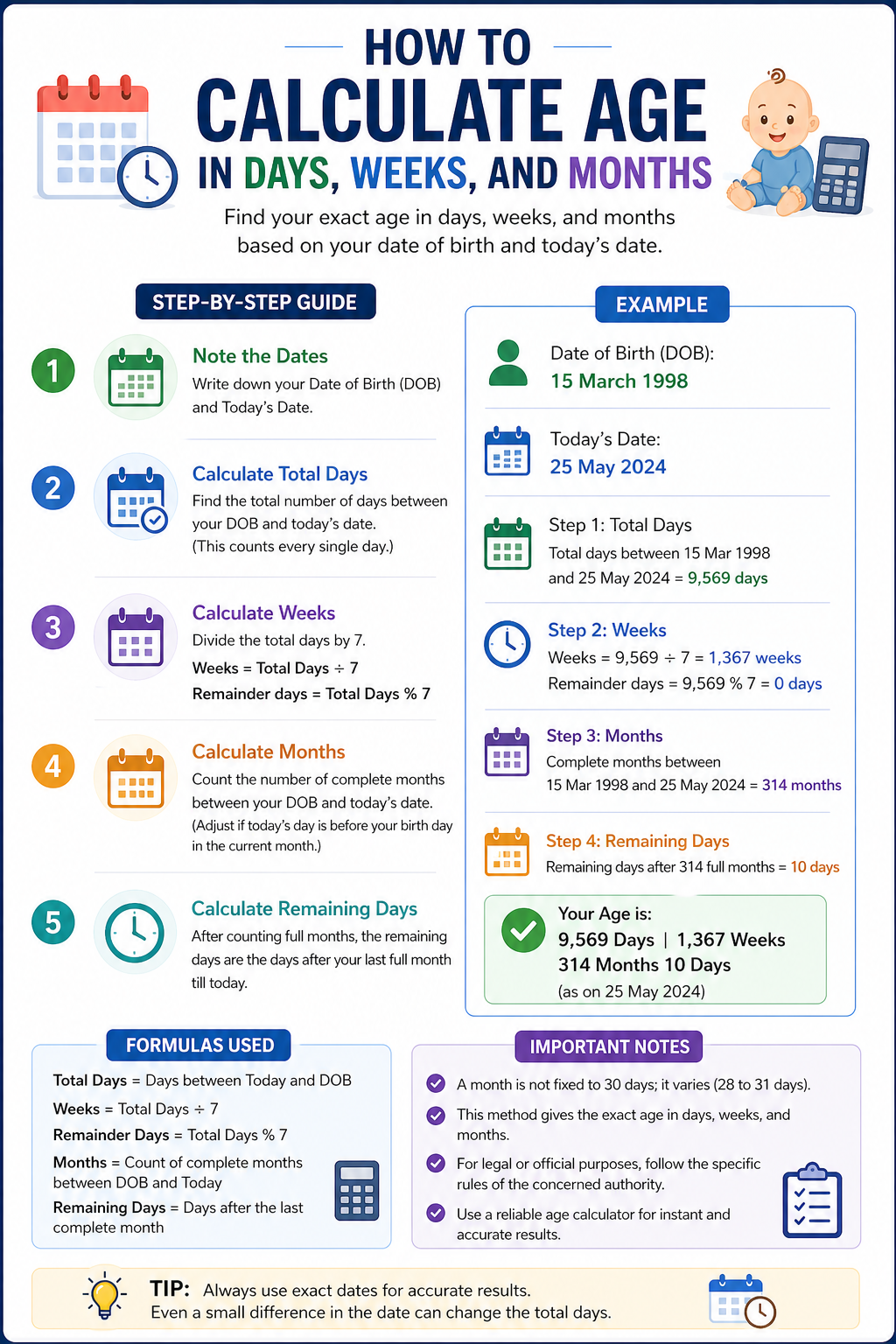
Here is the complete manual method to derive all three units from a date of birth. The process works right to left: days first, then months, then years.
Step 1 — Get years, months, days breakdown: Subtract your birth date from today's date. Start with days: if current day < birth day, borrow days from the previous month (using that month's actual day count — 28, 29, 30, or 31). Then months: if current month < birth month, add 12 and subtract 1 from years. Then years: subtract birth year from current year. The most common mistake is borrowing a fixed 30 days regardless of the actual month — always use the real day count of the month you are borrowing from.
Step 2 — Convert to total months: Multiply completed years by 12 and add remaining months. Formula: (years × 12) + months.
Step 3 — Convert to total days: Add the days in each complete year lived (watch for leap years), then add days elapsed in the current year.
Step 4 — Convert to total weeks: Divide total days by 7, dropping the remainder to get complete weeks.
For most practical purposes, our Age Calculator handles all four steps instantly and accurately — but understanding the manual method helps you verify results and apply the logic in other contexts like Excel or custom forms.
- Step 1: Subtract birth date from today (days → months → years, borrow right to left)
- Step 2: Total months = (years × 12) + remaining months
- Step 3: Total days = sum of complete years (with leap year check) + days in current partial year
- Step 4: Total weeks = total days ÷ 7
- Key rule: always use the actual day count of the month you borrow from — not a fixed 30
- Worked example: DOB = March 5, 2000 | Today = April 27, 2026 → Age = 26 years, 1 month, 22 days → 313 total months → ~9,549 total days → ~1,364 total weeks
Section 06
Excel Formulas for Age in Days, Weeks, and Months
If you need to calculate age in these units across a list of dates — for HR records, patient data, or student databases — Excel has reliable formulas for each.
Age in total days is the simplest: =TODAY()-B2 where B2 contains the birth date. Excel stores dates as numbers, so subtracting two dates gives the exact day count automatically.
Age in total months uses DATEDIF: =DATEDIF(B2, TODAY(), "M") returns the number of complete months between the birth date and today. This is the most reliable method as it handles varying month lengths correctly.
Age in total weeks: divide the total days result by 7 and use INT to drop the decimal — =INT((TODAY()-B2)/7). This gives complete weeks elapsed since birth.
For a combined breakdown in years, months, and days, combine three DATEDIF calls using "Y" for complete years, "YM" for remaining months ignoring years, and "MD" for remaining days ignoring months, joined with the & operator.
- Total days: =TODAY()-B2 (format the result cell as Number, not Date)
- Total months: =DATEDIF(B2, TODAY(), "M")
- Total weeks: =INT((TODAY()-B2)/7)
- Full breakdown: =DATEDIF(B2,TODAY(),"Y")&" yrs, "&DATEDIF(B2,TODAY(),"YM")&" mo, "&DATEDIF(B2,TODAY(),"MD")&" days"
- Always format birth date cells as Date — if formatted as Text, all formulas will return errors
Section 07
When You Actually Need Age in Days, Weeks, or Months
Beyond curiosity, there are many practical situations where age in units other than years is required or expected.
Infant and child development: The CDC tracks developmental milestones at 2, 4, 6, 9, 12, 18, 24, and 30 months. Parents and clinicians need to know a child's exact age in months — not just years — to apply these benchmarks correctly. For newborns, weeks are the standard unit until around 3 months of age.
Medical assessments: Many clinical tools, growth charts, and screening instruments require chronological age in months and days as input. Pediatric assessments routinely use the exact format: years, months, and days — not a rounded year figure.
Visa and immigration: Some immigration processes require age expressed in years, months, and days for official documentation. The Child Status Protection Act in immigration law, for example, calculates a child's 'adjusted age' by subtracting the number of days a petition was pending from the child's biological age at the time a visa becomes available — a calculation that works at the day level.
School enrollment: Many school systems determine eligibility based on whether a child reaches a specific age by a cutoff date. Knowing a child's exact age in months and days — not just years — is often necessary to verify enrollment eligibility precisely.
- Infant development: CDC milestones tracked at 2, 4, 6, 9, 12, 18, 24, 30 months
- Premature babies: adjusted age in weeks required for accurate developmental assessment
- Medical forms: many clinical instruments require age in years, months, and days exactly
- Immigration: some visa processes calculate age at the day level for eligibility determination
- School enrollment: cutoff dates require knowing exact age, not just birth year
- Personal milestones: 10,000 days alive, 1,000 weeks, and similar round-number moments
Section 08
How Our Age Calculator Gives You Every Unit at Once
Rather than converting between units manually, our Age Calculator does all of this from a single input. Enter your date of birth and the tool instantly returns your age in years, months, days, total weeks, total days, total hours, total minutes, and total seconds — all at once, all accurate to today's date.
You can also calculate age in all these units as of any specific date — not just today. Enter a past date to find out how old you were at a particular moment, or a future date to find out how old you will be. This is useful for checking a child's exact age on a school enrollment cutoff date, a medical appointment, or any other reference point.
All calculations account for actual calendar math: varying month lengths, leap years, and the exact day count between two dates. No fixed multipliers, no rounding errors.
- Enter date of birth → get years, months, days, weeks, hours, minutes, and seconds instantly
- Set any target date to calculate age as of that specific moment
- Handles leap years and uneven month lengths automatically
- Useful for: newborn age in weeks, total days alive, months for medical forms, or any milestone
FAQ
Common questions
How do I calculate how many days old I am?
Use our Age Calculator — enter your date of birth and it instantly shows your exact total days lived. Manually, count every calendar day from your birth date to today, adding 366 for leap years and 365 for standard years, then add the days elapsed in the current partial year.
How do I calculate my age in total months?
Multiply your completed years by 12 and add the number of completed months since your last birthday. For example, if you are 28 years and 5 months old: (28 × 12) + 5 = 341 total months. Our Age Calculator shows this automatically.
How do I calculate age in weeks from a date of birth?
Divide your total days lived by 7 and drop the remainder to get complete weeks. For example, 10,000 days ÷ 7 = 1,428 complete weeks. In Excel: =INT((TODAY()-B2)/7). Our Age Calculator shows total weeks alongside all other units.
How many days old am I if I was born in a specific year?
Enter your exact date of birth into our Age Calculator to get your precise total day count. As a rough guide, every year adds approximately 365 days (or 366 in a leap year), so a 30-year-old is roughly 10,958 days old — but the exact number depends on which specific years and leap years fall in your lifespan.
Why is age in weeks important for babies?
In the first few months of life, development happens so rapidly that years are too coarse a unit to track meaningfully. Paediatricians and health visitors track milestones week by week. For premature babies, exact age in weeks is essential for calculating corrected gestational age, which determines the developmental milestones a baby should be reaching.
How do I calculate age in months in Excel?
Use =DATEDIF(B2, TODAY(), "M") where B2 contains the date of birth. This returns the number of complete months between the birth date and today, handling varying month lengths correctly. Make sure the birth date cell is formatted as a Date, not Text.
What is the difference between age in months and total months?
Age in months as a breakdown means the months component of your age — e.g. '3 years and 4 months'. Total months means your entire lifespan expressed only in months — e.g. '40 months'. The formula for total months is: (completed years × 12) + remaining months.
Can I calculate my age in days, weeks, and months on a specific past or future date?
Yes. Our Age Calculator lets you set any target date — not just today. Enter your date of birth and your chosen date to get every unit of age as of that specific moment. This is useful for checking a child's exact age at a school enrollment cutoff, a medical appointment, or any other reference point.