
Section 01
What Does 'Calculating Age' Actually Mean?
Age is defined as the length of time a person has lived since birth. To calculate it, you compare the date of birth with a target date — usually today. The result tells you how much time has passed between the two dates.
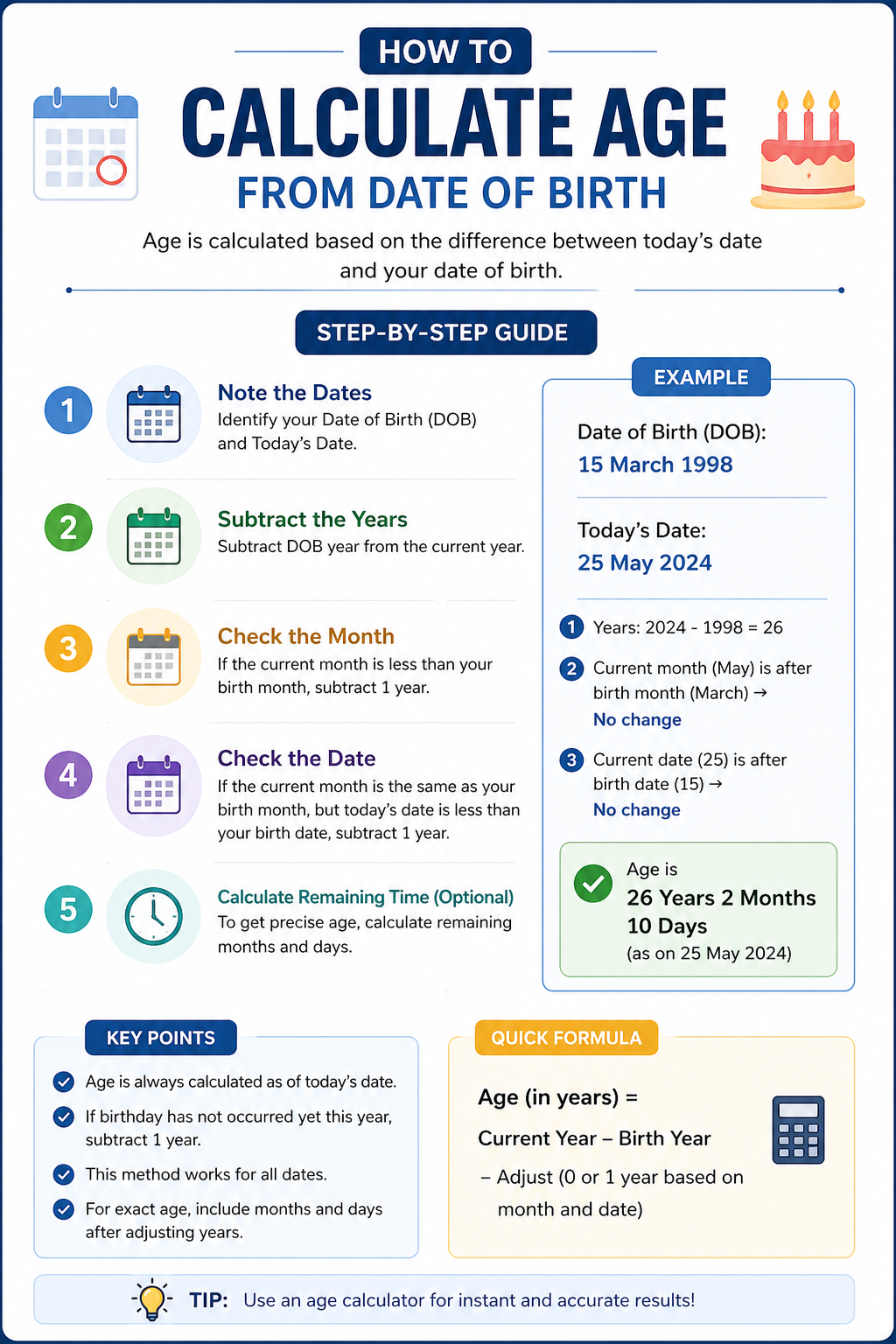
At its most basic, the formula is: Age = Current Date − Date of Birth. But getting a precise answer in years, months, and days requires a few extra steps to handle months of different lengths, leap years, and whether your birthday has already passed this year.
That's exactly what our Age Calculator does automatically. Just enter your date of birth and it instantly returns your exact age in every unit — no math required.
- Core formula: Age = Given Date − Date of Birth
- Must check whether the birthday has passed yet this year
- Month lengths vary (28–31 days), making manual day counts tricky
- Leap years add an extra day every 4 years and must be accounted for
Section 02
How Our Age Calculator Works
Our Age Calculator takes your date of birth and compares it against today's date — or any date you choose — to return a complete age breakdown. It calculates years, months, days, total weeks, total days, total hours, total minutes, and total seconds all at once.
You can also calculate your age on a specific date. This is useful for checking your age at the time of a past event, verifying eligibility for an application with a fixed cutoff date, or finding out how old a historical figure was at a key moment.
The calculator uses the internationally accepted Western age system — age starts at 0 at birth and increments by 1 on each birthday. It correctly handles all edge cases including leap year birthdays (February 29) and end-of-month date differences.
- Results in: years, months, days, weeks, hours, minutes, and seconds
- Supports any target date — not just today
- Handles leap year birthdays and uneven month lengths automatically
- Uses the international (Western) age system used worldwide for official purposes
Section 03
How Age Is Calculated — The Manual Method Explained
If you want to understand the math behind the result, here is how age is calculated step by step. This is the same logic our calculator applies instantly.
Step 1 — Years: Subtract the birth year from the current year. If the birthday hasn't occurred yet this year, subtract 1. Example: born in 1990, current year 2026, birthday already passed → 36 years.
Step 2 — Months: Subtract the birth month from the current month. If the current month is earlier than the birth month, add 12 to the current month and borrow 1 from the years count.
Step 3 — Days: Subtract the birth day from the current day. If the current day is smaller than the birth day, borrow 1 from the months count and add the number of days in the previous month.
As you can see, even manual calculation requires careful handling of borrowing across months and years — which is why using our Age Calculator saves time and eliminates errors.
- Example: DOB = July 25, 1985 | Date = January 28, 2021 → Age = 35 years, 6 months, 3 days
- January (1) < July (7), so borrow 1 year → use 2020; add 12 months → 12 + 1 − 7 = 6 months remaining
- Years: 2020 − 1985 = 35
- Days: 28 − 25 = 3 days
- Skip the manual steps — use the Age Calculator for instant, accurate results
Section 04
Your Age in Every Unit of Time
Most people think of age only in years. But age can also be expressed in units that are surprisingly revealing — and our Age Calculator shows all of them at once.
For example, a person who is 30 years old has lived approximately 360 months, 1,565 weeks, 10,958 days, 263,000 hours, or over 15 million minutes. These figures are calculated precisely based on your actual date of birth — not rounded approximations.
This full breakdown is useful for milestone tracking, medical records, insurance forms, pregnancy and infant development, or simply appreciating how much time you have lived.
- Years — the standard age for official and legal purposes
- Months — useful for infant development tracking and medical records
- Weeks — common in pregnancy and early childhood milestones
- Days — the precise count of days lived since birth
- Hours, minutes, seconds — for exact-moment curiosity or special milestones
Section 05
Calculating Age on a Specific Past or Future Date
Sometimes you need to know your age not as of today, but on a specific date. Our Age Calculator supports this directly — enter any target date and the tool calculates your age as of that moment.
Common use cases include checking age eligibility for a program with a fixed cutoff date, verifying age at the time of a historical event, calculating how old someone will be on a future date, and confirming age for retroactive legal or administrative records.
- School admission cutoffs — confirm a child's age on the enrollment date
- Retirement planning — find the exact date you'll reach a target age
- Historical research — calculate how old someone was at a specific event
- Legal documents — verify age as of a filing, hearing, or effective date
- Future birthdays — find out how old you'll be on any upcoming date
Section 06
Calculating Age in Excel (For Spreadsheet Users)
If you work with age data in Excel — for HR records, student databases, or demographic analysis — there are three reliable formulas. Each has different strengths depending on your use case.
DATEDIF is the most versatile: =DATEDIF(B2, TODAY(), "Y") returns complete years between the birth date and today, handling leap years automatically. Use "YM" for remaining months and "MD" for remaining days to get a full breakdown.
YEARFRAC is the most mathematically precise: =ROUNDDOWN(YEARFRAC(B2, TODAY(), 1), 0). Using basis 1 tells Excel to count actual days per month and per year — important for accuracy around leap year boundaries.
For a quick rough estimate, simple subtraction works: =INT((TODAY()-B2)/365). Easy to remember, but can have small errors in leap years. For high-accuracy needs, DATEDIF or YEARFRAC are always preferred. For one-off checks, our Age Calculator is faster than any formula.
- =DATEDIF(B2, TODAY(), "Y") — best for HR and large datasets
- =ROUNDDOWN(YEARFRAC(B2, TODAY(), 1), 0) — most precise for individual ages
- =INT((TODAY()-B2)/365) — quick estimate, not leap-year safe
- Full breakdown: combine DATEDIF with "Y", "YM", and "MD" joined by &
- Always format birth date cells as Date, not Text, or formulas will fail
- For single lookups, the Age Calculator is faster than building Excel formulas
Section 07
How Different Cultures Count Age
Age isn't counted the same way in every country. If you've ever seen someone give a different age than expected, it often comes down to which age system is in use.
The Western system — used internationally and by our Age Calculator — starts at 0 at birth and adds 1 year on each birthday. The traditional East Asian system, historically used in China, Japan, Korea, and Vietnam, starts at 1 at birth and adds 1 year for everyone on Lunar New Year — not on individual birthdays. The gap between East Asian age and Western age can be 1 or 2 full years. South Korea officially switched to the Western system in June 2023 for all legal and administrative purposes.
In Islamic culture, age is sometimes tracked using the Hijri lunar calendar, which has 354–355 days per year instead of 365–366. This means Hijri age accumulates slightly faster. Many people maintain both a Hijri age for religious purposes and a Gregorian age for official documents.
Our Age Calculator uses the internationally accepted Western system — the standard for legal, educational, medical, and official purposes worldwide.
- Western (international) system: starts at 0, adds 1 on each birthday — used by our calculator
- Traditional East Asian system: starts at 1, adds 1 on Lunar New Year — up to 2 years higher
- South Korea officially switched to the Western system in June 2023
- Islamic Hijri calendar: 354–355 days/year — age accumulates faster than Gregorian
- Our tool always uses the Western international standard
Section 08
Tricky Age Calculation Situations — Handled Automatically
A few situations make age calculation more complex than usual. Our Age Calculator handles all of them without any extra input from you.
Leap year birthdays (February 29): In non-leap years, the birthday is observed consistently using the internationally accepted approach. No manual adjustment needed.
Birthday not yet passed this year: If your birthday falls later in the year than today's date, we automatically reduce the year count by 1 to reflect that you haven't completed that year yet.
End-of-month dates: Calculating from February 28 to March 31 can reasonably yield different results depending on interpretation. Our calculator applies a consistent rule so results are always predictable and reliable.
- Leap year birthdays: handled automatically
- Birthday not yet passed: year count correctly reduced by 1
- End-of-month edge cases: resolved consistently by our logic
- These complexities are exactly why a purpose-built tool gives more reliable results than manual math
FAQ
Common questions
How do I calculate my age from my date of birth?
Use our Age Calculator — enter your date of birth and get your exact age in years, months, days, weeks, hours, and more instantly. Manually, subtract your birth year from the current year and subtract 1 if your birthday hasn't occurred yet this year.
What is the formula for calculating age?
Age = Current Date − Date of Birth. Subtract the birth year from the current year for full years, adjust down by 1 if the birthday hasn't passed yet this year, then calculate remaining months and days separately.
Can I calculate my age on a specific past or future date?
Yes. Our Age Calculator lets you enter any target date — not just today. Useful for eligibility checks, retirement planning, historical research, and legal document verification.
How many days old am I?
Our Age Calculator shows your exact age in total days alongside years, months, weeks, hours, minutes, and seconds. For someone 30 years old, this is approximately 10,958 days — but the exact number depends on your specific date of birth and leap years.
What if I was born on February 29 (leap year)?
Our calculator handles leap year birthdays automatically using the internationally accepted approach. No manual adjustment is needed.
Why might my manual age calculation be off by one year?
The most common reason is that your birthday hasn't passed yet this year, so your age should be 1 less than the raw year difference. Our Age Calculator handles this automatically.
How is age calculated in Korea differently from Western countries?
Traditionally, Koreans counted everyone as 1 at birth and added 1 year on Lunar New Year — not on birthdays. This made Korean ages 1–2 years higher than Western ages. South Korea officially switched to the Western system in June 2023. Our calculator uses the Western international standard.
What is the difference between age in years and age in total days?
Age in years is the number of complete birthdays you've had. Age in total days is the exact count of calendar days from your birth date to today, including all leap days. Our calculator shows both simultaneously.